
Description
Tired of bloated e-commerce plugins that slow down your corporate website? B2B Product Showcase is the perfect solution for businesses that want to showcase their products beautifully without unnecessary shopping cart functionality.
✅ Why Choose B2B Product Showcase?
- 🎯 B2B-Focused Design – Built exclusively for business-to-business websites, with enterprise-grade product display layouts and inquiry management
- ⚡ Blazing Fast Performance – Lightweight codebase that won’t slow down your site, optimized for Google PageSpeed Insights
- 📱 Fully Responsive – Seamless display on all devices from desktop to mobile
- 🔍 SEO Optimized – Structured data markup, breadcrumb navigation, and clean URLs for better search rankings
- 🛠️ Easy to Use – Intuitive admin interface with custom post type for product management
- 🎨 Highly Customizable – Rich hooks, template overrides, and developer-friendly architecture
✨ Key Features That Set Us Apart
- Smart Inquiry System – Built-in inquiry buttons with AI-powered customer service integration (SPEC v2 protocol)
- Advanced Category Management – Hierarchical categories and tag system for organized product catalogs
- Visual Shortcode Generator – Create beautiful product displays with real-time preview in admin dashboard
- Widget Support – Add product showcases to sidebars with automatic CSS loading
- SEO Content Management – Customize top and bottom content for archive, category, and tag pages
- Security First – Strict nonce verification for all AJAX operations and data submissions
- Enterprise Scalability – Model-driven architecture for future growth and custom integrations
🚀 Core Functions
📦 Product Management
- Complete Product Profiles: Title, detailed description, featured images, and multi-image galleries
- Organized Categorization: Hierarchical categories and flexible tagging system
- Inquiry Management: Customizable inquiry buttons with AI-powered customer service integration
- SEO Optimization: Built-in meta fields for better search engine visibility
🎨 Frontend Display
- Beautiful Archive Pages: Grid layouts with responsive design
- Detailed Product Pages: Comprehensive product information with image galleries
- Category & Tag Pages: Organized browsing experience
- Powerful Shortcodes:
[naibabiji_b2b_products]and[naibabiji_b2b_product_categories]for flexible display - Sidebar Widgets: Add product showcases to any sidebar with automatic CSS loading
⚙️ Admin Dashboard
- Intuitive Interface: Clean, organized settings with tab-based navigation
- Visual Shortcode Generator: Create custom product displays with real-time preview
- SEO Content Management: Customize top and bottom content for archive, category, and tag pages
- Customizable Styles: Button colors, layout options, and display controls
🔧 Developer Friendly
- Rich Hooks & Filters: Extensive customization options
- Template Override Support: Easy integration with any WordPress theme
- AJAX Interfaces: Modern, interactive functionality
- Clean Code Structure: Well-documented, maintainable codebase
- Enterprise Architecture: Model-driven design for scalability
🎯 Who This Plugin Is For
B2B Product Showcase is perfect for:
– Manufacturers – Showcase your product catalog to potential buyers
– Distributors – Display your product lines to retailers and partners
– Service Providers – Highlight your service offerings with detailed profiles
– Corporate Websites – Create professional product galleries without e-commerce complexity
– Developers – Extend functionality with rich hooks and template overrides
💡 Common Use Cases
- Corporate Product Catalogs – Create organized product galleries for your business website
- Trade Show Exhibits – Display products online for virtual trade shows
- Partner Portals – Share product information with authorized partners
- Sales Enablement – Provide sales teams with up-to-date product information
- Lead Generation – Capture inquiries directly from product pages
Support
For technical support, please visit the plugin’s page or WordPress.org support forum.
License
This plugin is released under the GPL v2 or later license.
Screenshots
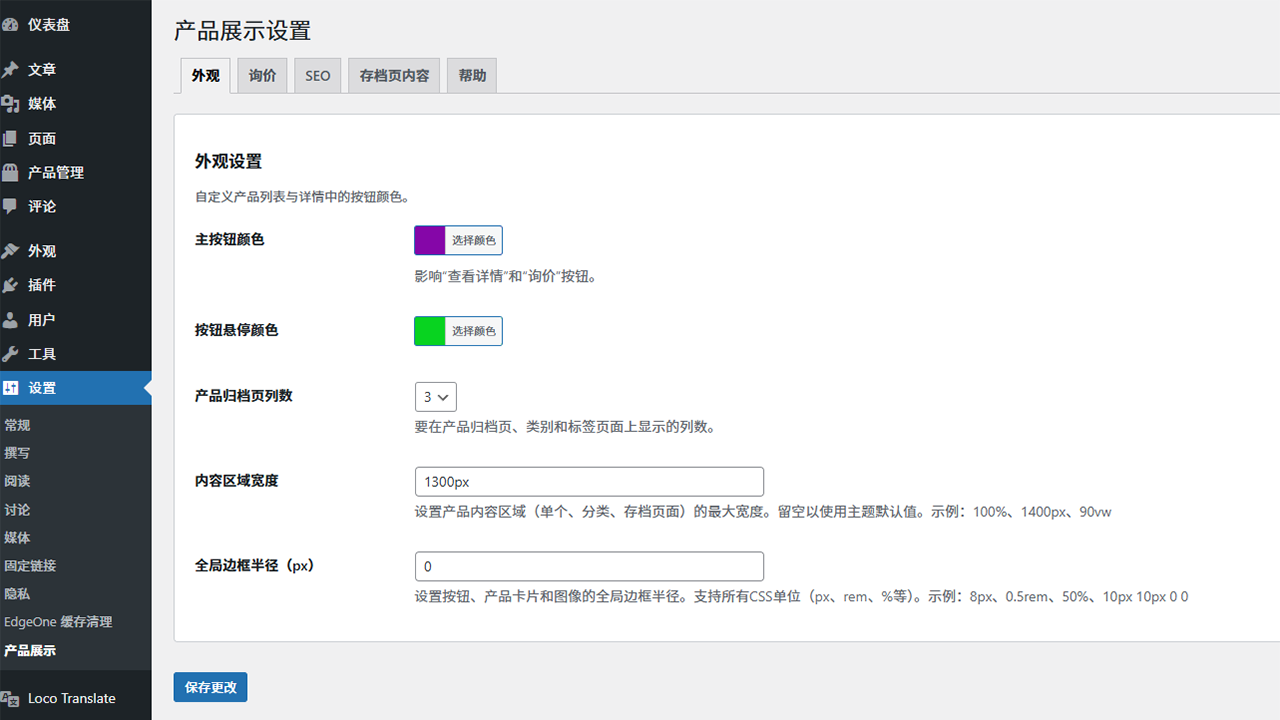
Admin Settings Interface – Intuitive tab-based navigation with rich customization options 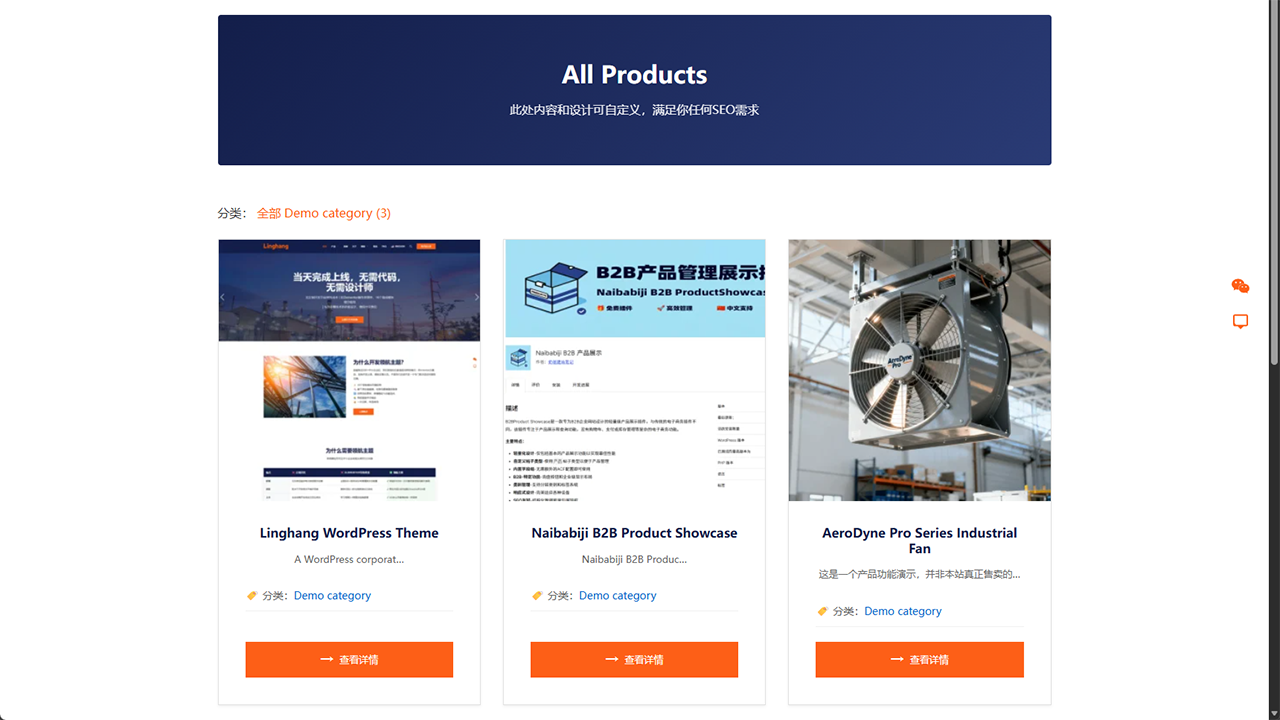
Frontend Product Showcase – Responsive grid layout that adapts perfectly to all devices 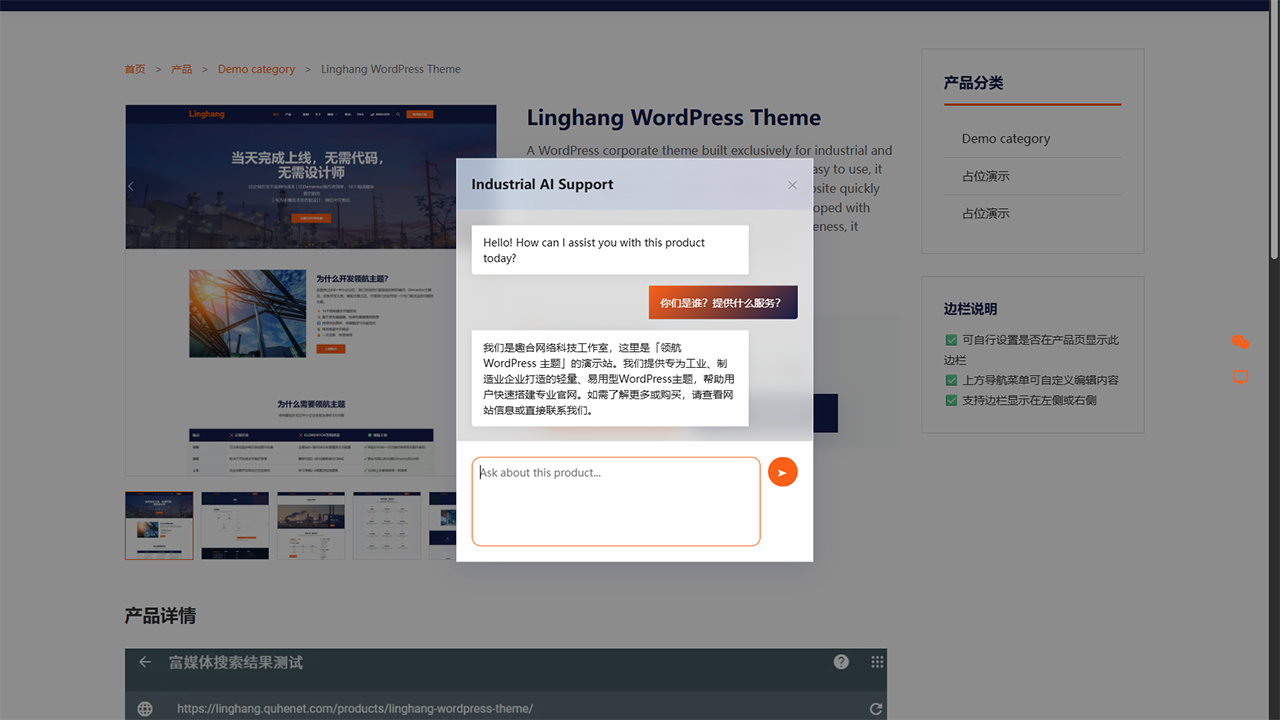
AI Chat Functionality – Smart customer service integration to enhance user experience 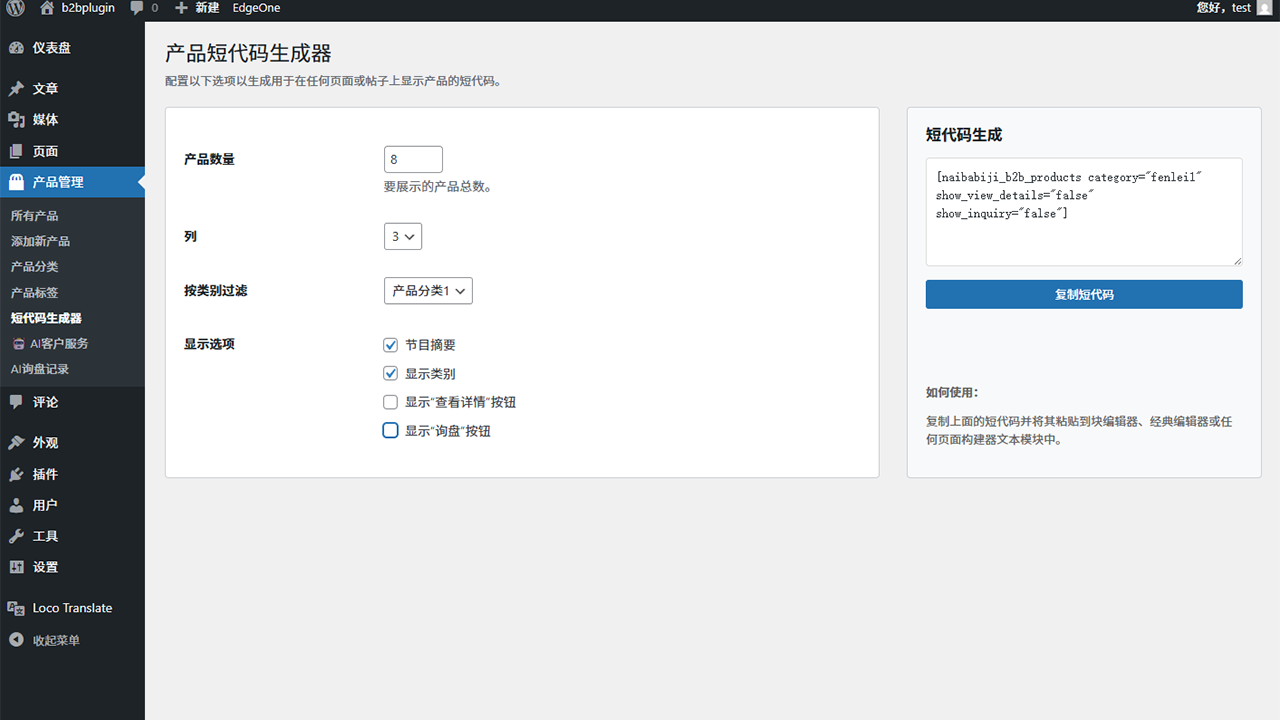
Shortcode Generator – Visual product display creation with real-time preview functionality
Installation
🚀 Quick Start Guide
- Upload & Activate: Install the plugin through WordPress admin or upload files to
/wp-content/plugins/naibabiji-b2b-product-showcase/ - Configure Settings: Go to
Settings -> Product Showcaseto customize your display options - Add Products: Create new products using the custom “Products” post type
- Display Products: Use shortcodes or widgets to showcase products on your site
- Optimize SEO: Add custom content to archive, category, and tag pages for better search rankings
💡 Pro Tip: Use the visual shortcode generator in the admin dashboard to create beautiful product displays with real-time preview!
FAQ
-
Does this plugin support shopping cart functionality?
-
No. This plugin is designed for B2B businesses, focusing on product display and inquiry functionality, without e-commerce features like shopping carts or payments.
-
How can I customize product templates?
-
You can create the following template files in your theme directory to override the default templates:
–single-naibb2pr_products.php– Single product page
–archive-naibb2pr_products.php– Product archive page
–taxonomy-naibb2pr_product_category.php– Product category page
–taxonomy-naibb2pr_product_tag.php– Product tag page -
What shortcodes are supported?
-
The plugin provides the following shortcodes:
–[naibabiji_b2b_products]– Display product grid
–[naibabiji_b2b_product_categories]– Display product categoriesFor detailed parameters, please check the usage instructions on the settings page.
-
Yes! You can use the plugin’s shortcodes in any text widget with the following features:
Key Features:
* Smart Style Loading – Automatically detects shortcodes in sidebar and loads CSS styles only when needed
* Flexible Configuration – Supports product count, column layout, category filtering and other parameter settings
* Responsive Design – Automatically adjusts to single column layout on mobile devices
* Theme Compatibility – Works seamlessly with most WordPress themesUsage Steps:
1. Go to WordPress adminAppearance Widgets
2. Add a “Text” widget to your sidebar
3. Paste the product shortcode into the text widget
4. Customize the shortcode parameters as needed
5. Save settingsRecommended Configuration:
* For sidebars:[naibabiji_b2b_products limit="3" columns="1" show_category="false" show_excerpt="false"]
* This configuration works well in sidebar spaces, showing 3 products in a single column layout without categories or excerpts -
This issue has been fixed in v1.0.13. If you still encounter style problems, please try:
- Clear Cache – If using a cache plugin, clear all caches
- Refresh Page – Use Ctrl+F5 to force refresh the browser
- Check Widget Configuration – Ensure the widget is properly saved
- Theme Compatibility – Some themes may require additional CSS adjustments
If the problem persists, please contact technical support and provide the theme name for further troubleshooting.
Reviews


Contributors & Developers
“B2B Product Showcase – Product Catalog & Quote Request” is open source software. The following people have contributed to this plugin.
Contributors
“B2B Product Showcase – Product Catalog & Quote Request” has been translated into 1 locale. Thank you to the translators for their contributions.
Translate “B2B Product Showcase – Product Catalog & Quote Request” into your language.
Interested in development?
Browse the code, check out the SVN repository, or subscribe to the development log by RSS.
Changelog
4.1.0
- New Feature: Built-in Inquiry Form Mode with unified design.
- New Feature: Premium UI System featuring Glassmorphism and responsive 2-column layout.
- New Feature: Intelligent AI Fallback system that automatically switches to the inquiry form on technical errors.
- Improved: Standardized form controls across all plugin components.
- Improved: Optimized database query security and satisfied WordPress coding standards.
- Fixed: Resolved various output escaping and linting warnings in templates and settings.
4.0.1
- Fixed: Action hook callback issue in
class-leads-handler.php– addedrun_cleanup_for_cron()wrapper method to prevent return values in cron callbacks. - Improved: Code quality validated with PHPStan Level 3 static analysis.
- Changed: Plugin name updated to comply with WordPress.org repository guidelines (removed “Plugin” from name).
4.0.0
- New Feature: Industrial AI Support: Integrated AI customer service system with SPEC v2 protocol for automated inquiry handling.
- New Feature: Archive Page SEO Content: Added ability to add custom content to the top and bottom of product archive/category/tag pages.
- New Option: Hide Title: Added option to hide default titles on archive, category, and tag pages for flexible header design.
- Improved: Settings Page Layout: Reorganized settings page with tab-based navigation for better user experience.
- AI Context Awareness: Automatic product data extraction (SKU, Price, Description) for precise AI responses.
- Shortcode Generator: Visual tool in admin dashboard for easy shortcode creation with real-time preview.
- CSS Variable Optimization: Enhanced
:rootCSS variables for better theme synchronization. - Production Security: Enhanced all AJAX and save operations with strict nonce verification.
3.1.0
- Simplified: Removed the confusing “Enable Inquiry Button Globally” switch from the settings page.
- Improved: Inquiry button logic now defaults to “Enabled” for all products unless explicitly disabled individually.
- Fixed: Resolved a bug where the inquiry button was not checked by default when publishing new products.
3.0.2
- Fixed: Short description content with inline HTML elements (e.g.
<strong>) was rendered on a single line instead of separate paragraphs due towpautop()not handling single line breaks between inline elements correctly. - Improved: Line endings are now normalized and single newlines are converted to double newlines before
wpautop()processing, ensuring each line gets its own<p>tag.
3.0.1
- Fixed: Resolved Google Structured Data “Missing price” and “Missing SKU” errors by adding an optional price field and optimizing JSON-LD generation.
- Improved: Schema.org “Offer” data is now only generated if a price is specified, ensuring B2B compatibility.
- Improved: Enhanced the description in the admin settings for Schema.org markup with important usage tips.
3.0.0
- Major Architectural Rebirth: Transitioned to a professional model-driven architecture for enterprise-grade scalability.
- New Product Model: Centralized all data access through the
Naibabiji_B2B_Productclass, ensuring consistent logic and cleaner templates. - Efficient Grouped Meta: All product-specific metadata is now stored in a single, high-performance array, reducing database bloat.
- One-Click Migration Tool: Added an automated utility in the settings page to safely upgrade legacy product data to the new v3.0.0 format.
- Shortcode Generator: Introduced a brand new visual tool in the admin dashboard for easy shortcode creation with real-time preview.
- Production Security: Enhanced all internal AJAX and save operations with strict nonce verification and context-aware escaping.
- Modular SEO: Decoupled Schema.org logic into a standalone builder for improved rich result precision.
2.0.3
- Added smooth transition animation when switching product detail page images
- Added loading spinner animation during image switch, with color synced to admin button color setting
- Added opacity transition effect during image loading for better user experience
- Thumbnail active border color now follows the admin button color setting
- Added language file direct access protection for zh_CN translation
2.0.2
- Changed subcategory display from vertical list to horizontal buttons for better visual balance
- Synchronized subcategory button styles with global plugin button settings (colors, hover effects, border radius)
- Improved responsive layout for subcategory navigation on mobile devices
2.0.1
- Fixed button color settings not taking effect due to CSS specificity conflicts with themes
- Changed CSS
backgroundshorthand tobackground-colorto allow dynamic inline styles to override defaults - Added product card hover border color to follow the admin button color setting
2.0.0
- Major Feature Update: Separated SEO content area into independent top and bottom sections
- Added ability to set different SEO content for page top and bottom positions
- Each position has independent enable/disable toggle
- Automatic data migration from old single content field to new dual-field structure
- Improved flexibility and control over category/tag page SEO optimization
- Breaking change: Removed position dropdown, now using separate editors for top/bottom content
- New backend product display column count setting for frontend products
1.0.13
- Fixed foreach() warning error in sidebar widget processing
- Added type checking for widget_ids to prevent type mismatch errors
- Improved data validation for WordPress sidebar widgets configuration
- Enhanced plugin stability and error handling
1.0.12
- Enhanced CSS loading logic with sidebar widget shortcode detection
- Fixed CSS styles not working in sidebar widgets
- Smart detection of shortcode content on pages, loading CSS resources only when needed
- Improved responsive design for better product card display on mobile devices
1.0.11
- Added Elementor shortcode support in SEO content area
- Standardized function and variable prefixes to comply with WordPress plugin best development practices
1.0.10
- Added toggle to enable/disable product meta information display
- Improved translations and updated localization files
1.0.9
- Added button color customization entry for front and back, managers can quickly adjust styles to match brand vision
- Replace the product short description with the fill-in area, use a rich text editor to optimize the input experience and improve Gutenberg compatibility
1.0.8
- Changed product category URL slug from ‘naibb2pr-product-category’ to ‘product-category’
- Improved URL structure for better SEO and user experience
- Note: After updating, please deactivate and reactivate the plugin or visit Settings > Permalinks and save to refresh rewrite rules
1.0.7
- Changed product archive page URL from ‘naibb2pr-products’ to ‘products’
- Fixed PHP syntax error in admin settings page
1.0.6
- Fixed an issue with WordPress official review feedback
- Optimized internal connection styles and script loading to comply with WordPress best practices
- Improved sanitize_callback parameter configuration of register_setting () function
- Make sure all custom article types and taxonomies are named with unique prefixes
- Removed the direct < style > and < script > tags and replaced them with wp_add_inline_style () and wp_add_inline_script () functions
- Enhanced code security and WordPress compatibility
- Fixed a PHP syntax error
1.0.5
- Optimize the display of search results page
- Removed deprecated load_plugin_textdomain() function call for WordPress 4.6+ compatibility
- Enhanced security with improved nonce verification in form processing
- Fixed input sanitization in POST and GET request handlers
- Improved security logging mechanism to follow WordPress best practices
- Replaced direct database query with WordPress API functions in meta fields handling
1.0.4
- Enhanced security in AJAX handlers
- Improved nonce verification and input sanitization
- Added recursive array sanitization
- Added GET parameter sanitization method
- Fixed permission checks in admin functions
- Improved security event logging
1.0.3
- Front-end display bug fixes
1.0.2
- Multi-language support
1.0.1
- Modify the code to meet the requirements for submitting to the official WordPress repository
1.0.0
- Initial release
- Basic product showcase functionality
- Custom post types and taxonomies
- Frontend templates and shortcodes
- Admin dashboard settings page
- AJAX functionality support
- Developer hook system